


How to Cancel an Air India Ticket Booked Online – A Simple, Stress-Free Guide
Need to cancel your Air India ticket online? Whether it’s a sudden change in plans or a missed connection, we’ll show you exactly how to do it-step-by-step.
Whether it’s a last-minute emergency, a scheduling conflict, or simply a change of heart, cancelling a flight ticket is never fun – but if your ticket is with Air India, the process can actually be pretty smooth if you know what to do.
In this blog, we’ll walk you through exactly how to cancel an Air India ticket booked online, explain the refund policy, break down cancellation charges, and even show you how to avoid unnecessary losses – all in a totally human, jargon-free way. By the end, you’ll feel confident handling your booking, no matter what your situation is.
How to Cancel an Air India Ticket Booked Online – Step-by-Step

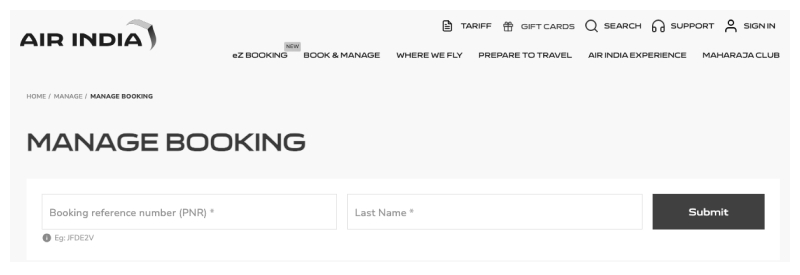
Air India gives you two easy ways to cancel your flight if you booked it online:
- Through the official Air India website
- Via the Air India mobile app
Let’s look at both.
Cancel Through AirIndia.com (Website)
- Visit www.airindia.com
- Click on “Manage Booking” at the top menu.
- Enter your Booking Reference Number (PNR) and last name exactly as mentioned during booking.
- Click Retrieve Booking.
- You’ll see your flight details on screen. Look for the “Cancel” button (usually at the bottom or right side).
- Click Cancel, and confirm your action.
- Once done, you’ll receive a confirmation email or SMS. Refund (if applicable) will be processed soon after.
Cancel Through the Air India Mobile App
- Open the Air India app on your phone (Android/iOS)
- Tap on My Bookings.
- Log in or enter your PNR and last name.
- Tap on the booking you want to cancel.
- Choose Cancel Booking, and confirm.
- Done! You’ll get an email and SMS instantly.
- The mobile app is handy if you’re cancelling on the go or right before heading to the airport
Can I Cancel Anytime?
Here’s what you should know:
- Yes, you can cancel most Air India bookings online up to a few hours before departure.
- But – there are cutoff times.
- For domestic flights, cancellation must be done at least 2 hours before departure.
- For international flights, give it at least 4 hours.
- After these cutoff times, you’ll need to contact Air India’s support or cancel directly at the airport.
Air India Cancellation Charges (Updated)
Now, let’s talk numbers.
Air India does charge a fee for cancellation – the amount depends on factors like:
- Whether the flight is domestic or international
- Your fare class (Economy, Business, etc.)
- How close the cancellation is to the departure time
Here’s a quick breakdown:
What About the Refund?
Wondering how and when you’ll get your money back? Here’s what happens after you cancel:
If eligible, the refund is automatically processed to the original payment method.
- Processing time:
- Card/UPI – 5 to 7 working days
- Net banking – 7 to 10 working days
- Travel agent bookings – Contact your agent directly
- You’ll receive a confirmation email and refund receipt from Air India once the refund is initiated.
What Tickets Can’t Be Cancelled Online?
Sometimes, you won’t see the cancel option on your screen. Here’s why:
- You booked via a third-party travel site
- Your flight is within 2 hours (domestic) or 4 hours (international)
- You’ve already checked in online
- It’s a non-refundable fare
In these cases, contact Air India Customer Support at 1860 233 1407 (India) or your local Air India office.
What If I Missed My Flight?
If you didn’t cancel your Air India ticket online before departure, it’s treated as a no-show.
- You won’t get a refund (unless you cancel in advance)
- You’ll lose the full ticket value (in most cases)
So, always cancel at least 2–4 hours before the flight to retain some refund value.
Pro Tips to Avoid Cancellation Charges
Let’s be smart about this. Here are 5 golden hacks that can save you money when cancelling Air India tickets:
1. Use the 24-Hour Grace Period
Booked a flight and immediately realized you need to change it? If it’s within 24 hours and your departure is more than 7 days away, you can cancel for FREE.
2. Opt for a Flexible Fare
When booking, look for flexi or refundable fare options. They might cost a bit more upfront but can save thousands if you need to change or cancel later.
3. Use Travel Insurance
Many credit cards or travel policies cover cancellation charges due to emergencies. Always check your benefits.
4. Avoid Last-Minute Cancellations
The closer you cancel to the flight time, the higher the fee. Cancel as early as possible to retain more of your ticket value.
Final Thoughts: Cancel Like a Pro
Cancelling your Air India ticket doesn’t have to be confusing or stressful. With just a few clicks, you can:
- Cancel your booking online
- Understand your refund eligibility
- Avoid hefty penalties with smart timing
- Save more next time using coupon platforms like 99CashDeals
Whether you’re adjusting travel plans last-minute or rebooking later, knowing how to cancel your Air India ticket online gives you peace of mind.
Next time you’re booking or cancelling with Air India, you’ve got this blog to guide you. And don’t forget to grab those Air India promo codes from 99CashDeals before confirming your next trip.